


Grant Eligibility Map – Income Threshold Score
This tool will help you determine if a property is within a Census Tract with an Income Threshold score of 100 or below (as identified by the StatsAmerica Distress Tool). This Income Threshold score is used to determine eligibility for some of our grants. Please review the specific eligibility requirements for the grant you are interested in.
How to use the map
To meet this eligibility criteria, your home or business address must fall within the green shaded areas of the map. The shaded areas represent Portland census tracts with an Income Threshold of 100 or below. This map is updated annually using the latest data from the StatsAmerica Distress Tool. Check to see if you meet this eligibility criteria:
1. Find your property
- Open the map in a new window.
- Click/tap the magnifying glass in the red area at the top left.

- Type in the address and click Enter/Return or click on the blue address link.
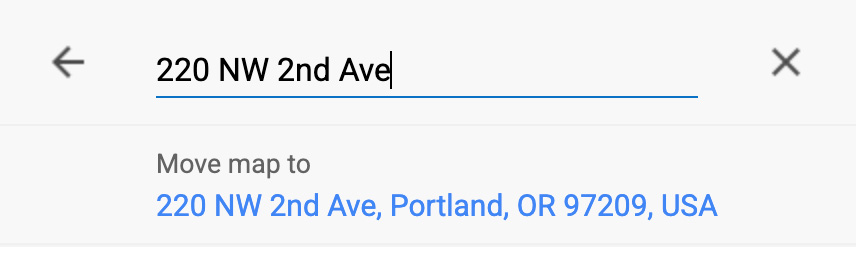
2. Look for the shaded area
The address will be plotted on the map with a red dot. If the address is within one of the green shaded areas (as in the example on the left), the property is within a census tract with an Income Threshold of 100 or below. If it isn’t, it will look like the example on the right.

3. Complete your application
Close the window, go back to your grant application form and answer the eligibility question.
Mapa de elegibilidad para las subvenciones
Puntuación del umbral de ingresos
Esta herramienta le ayudará a determinar si una propiedad se encuentra dentro de una zona censal con una puntuación de umbral de ingresos de 100 o menos (según lo identificado por la herramienta de evaluación de dificultades económicas de StatsAmerica). Esta puntuación de umbral de ingresos se utiliza para determinar la elegibilidad para algunas de nuestras subvenciones. Revise los requisitos de elegibilidad específicos para la subvención que le interese.
Cómo utilizar el mapa
Para cumplir con este criterio de elegibilidad, la dirección de su casa o negocio debe estar dentro de las áreas sombreadas en verde del mapa. Las áreas sombreadas representan las zonas censales de Portland con un umbral de ingresos de 100 o menos. Este mapa se actualiza anualmente con los datos más recientes de la herramienta de evaluación de dificultades económicas de StatsAmerica. Verifique si cumple con este criterio de elegibilidad:
Encuentre su propiedad
- Abra el mapa en una ventana nueva.
- Haga clic/pulse la lupa en la zona roja de la esquina superior izquierda.
- Ingrese la dirección y haga clic en Enter/Return (Intro) o haga clic en el enlace azul de la dirección.
Busque el área sombreada
La dirección se mostrará en el mapa con un punto rojo. Si la dirección se encuentra dentro de una de las áreas sombreadas en verde (como en el ejemplo de la izquierda), la propiedad está dentro de una zona censal con un umbral de ingresos de 100 o menos. Si no es así, se verá como en el ejemplo de la derecha.
Complete su solicitud
Cierre la ventana, vuelva al formulario de solicitud de subvención y responda la pregunta de elegibilidad.
Bản đồ Điều kiện Hội đủ Nhận Tài trợ
Điểm Ngưỡng Thu nhập
Công cụ này sẽ giúp quý vị xác định xem bất động sản có nằm trong Khu vực Điều tra Dân số (Census Tract) có Điểm Ngưỡng Thu nhập (Income Threshold) bằng hoặc dưới 100 hay không (theo như được xác định bởi Công cụ StatsAmerica Distress Tool). Điểm Ngưỡng Thu nhập này được sử dụng để xác định điều kiện hội đủ cho một số khoản tài trợ của chúng tôi. Vui lòng xem xét kỹ các yêu cầu về điều kiện hội đủ cụ thể để nhận khoản tài trợ mà quý vị quan tâm.
Cách sử dụng bản đồ
Để đáp ứng tiêu chí đủ điều kiện này, địa chỉ nhà ở hoặc doanh nghiệp của quý vị phải nằm trong các khu vực được tô màu xanh lá trên bản đồ. Các khu vực được tô màu thể hiện các khu vực điều tra dân số (census tract) của Portland có Điểm Ngưỡng Thu nhập (Income Threshold) bằng hoặc dưới 100. Bản đồ này được cập nhật hàng năm bằng dữ liệu mới nhất từ công cụ StatsAmerica Distress Tool. Kiểm tra xem quý vị có đáp ứng tiêu chí đủ điều kiện này không:
Tìm bất động sản của quý vị
- Mở bản đồ trong một cửa sổ mới.
- Nhấp/chạm vào biểu tượng kính lúp trong vùng màu đỏ ở góc trên bên trái.
- Nhập địa chỉ và nhấn Enter/Return hoặc nhấp vào liên kết địa chỉ màu xanh dương.
Tìm khu vực được tô màu
• Địa chỉ sẽ được hiển thị trên bản đồ bằng một chấm đỏ. Nếu địa chỉ nằm trong một trong các khu vực được tô màu xanh lá (như ví dụ bên trái), bất động sản nằm trong một khu vực điều tra dân số có Điểm Ngưỡng Thu nhập bằng hoặc dưới 100. Nếu không, nó sẽ giống như ví dụ bên phải.
Hoàn tất đơn đăng ký của quý vị
Đóng cửa sổ, quay lại biểu mẫu đăng ký nhận tài trợ của quý vị và trả lời câu hỏi về điều kiện hội đủ.
Карта зон, соответствующих критериям для получения гранта
Индекс уровня дохода
С помощью этого инструмента можно определить, находится ли предприятие в пределах переписного района с индексом уровня дохода 100 или ниже (по данным инструмента StatsAmerica Distress Tool). Индекс уровня дохода используется для определения соответствия критериям участия в некоторых грантовых программах. Ознакомьтесь с критериями получения гранта, который вас интересует.
Как использовать карту
Чтобы соответствовать критериям участия в этой программе, ваше жилье или предприятие должно находиться в пределах выделенных на карте зеленым цветом зон. Выделенные цветом зоны обозначают переписные районы Портленда с индексом уровня дохода 100 или ниже. Карта обновляется ежегодно на основе последних данных инструмента StatsAmerica Distress Tool. Проверьте, соответствуете ли вы этим критериям.
Найдите свой объект недвижимости.
- Откройте карту в новом окне.
- Нажмите на значок увеличительного стекла в красной зоне в левом верхнем углу страницы.
- Введите в поле адрес объекта недвижимости и нажмите клавишу Enter/Return или щелкните по синей ссылке на адрес.
Ищите выделенные цветом зоны.
Адрес здания будет отмечен на карте красной точкой. Если он находится в пределах одной из зон зеленого цвета (как на примере слева), объект недвижимости входит в переписной район с индексом уровня дохода 100 или ниже. Адрес может не входить в такой переписной район — как на примере справа.
Завершите заполнение заявки.
Закройте это окно, вернитесь к форме заявки на получение гранта и ответьте на вопрос относительно соответствия критериям.
補助金資格地圖
收入門檻分數
本工具可協助您判斷不動產是否位於收入門檻分數為 100 或以下的人口普查區內(由 StatsAmerica 壓力工具 — StatsAmerica Distress Tool 決定)。此收入門檻分數用於判定部分補助金計劃之資格。請查看您感興趣補助金計劃的詳細資格條件。
查詢您的不動產
- 在新視窗開啟地圖。
- 點擊/輕觸左上角紅色區域的放大鏡圖示。
- 輸入地址並點擊「輸入/返回」(Enter/Return),或點擊藍色地址連結。
查看陰影區域
該地址將以紅點標示於地圖上。若地址位於綠色陰影區域內(如左側範例所示),則表示該不動產位於收入門檻分數為 100 或以下的人口普查區內。若不在範圍內,則會如右側範例所示。
完成您的申請
關閉視窗,返回補助金申請表並回答資格問題。